
Step by step
- 1
Pick a clear photo
A sharp head-and-shoulders shot in even light, facing the camera, with your face not too small in the frame.
- 2
Upload and choose a style
Chibi avatar suits a profile picture; Classic animated gives a fuller drawn portrait.
- 3
Generate and compare
Each picture takes about half a minute. Run it again or try the other style until one feels like you.
- 4
Download or make it move
Download the picture, or press Make it move to turn it into a short clip.
A real example
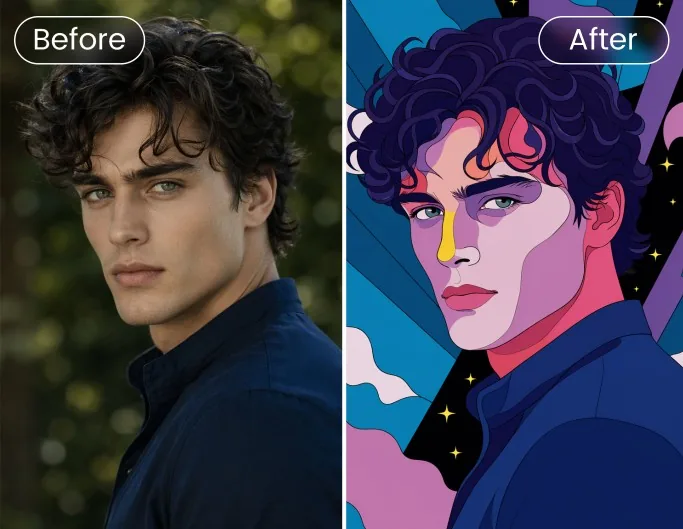
Tips that make it work
- Hair color and a signature item (glasses, a hoodie, earrings) carry over, so wear what you want your anime self to have.
- A plain background behind you gives the cleanest chibi avatar.
What it can't do yet
The photo-to-cartoon tool has no dedicated anime style; chibi and classic animated are the closest. For anime line art and cel shading from your photo, upload it to the anime GIF maker with the Anime style, or film a 2-15 second selfie video and use video to anime.
Questions people ask
Can I make an animated anime profile picture?
Yes. The anime GIF maker takes your selfie and returns a looping anime GIF of you blinking or smiling, which works as a profile picture.
Will the anime version keep my glasses and hair color?
Yes. The styles are set up to keep face shape, hairstyle, hair color, skin tone and outfit, so details like glasses come through.
Can my friends be in the same picture?
Yes. Group photos work, and everyone is redrawn in the same style. Pick a photo where each face is reasonably large.
Ready to make yours?
The prompt above is written for exactly this. Start with it and change the details to fit.
Open Photo to CartoonRelated questions
- How do I turn a photo into an animated GIF?
- How do I make a cartoon avatar for my YouTube channel?
- How do I animate my original character (OC)?
- How do I bring my D&D character to life as an animation?
- How do I make an animated sprite for my indie game?
- How do I make a custom animated reaction GIF?
- How can I turn my guinea pig or hamster into an animated cartoon?
- How do I make an anime GIF of my pet?