
Step by step
- 1
Take a close photo
Get low and close so the face is large in the frame, in soft daylight, on a plain towel or floor.
- 2
Upload and pick a style
Add the photo and choose a style; chibi and 3D cartoon suit round little pets.
- 3
Download the cartoon
It's drawn in about half a minute. Download it, or try the same photo in another style.
- 4
Animate it
Press Make it move to open the video generator with the cartoon as the first frame, then describe the motion.
A real example
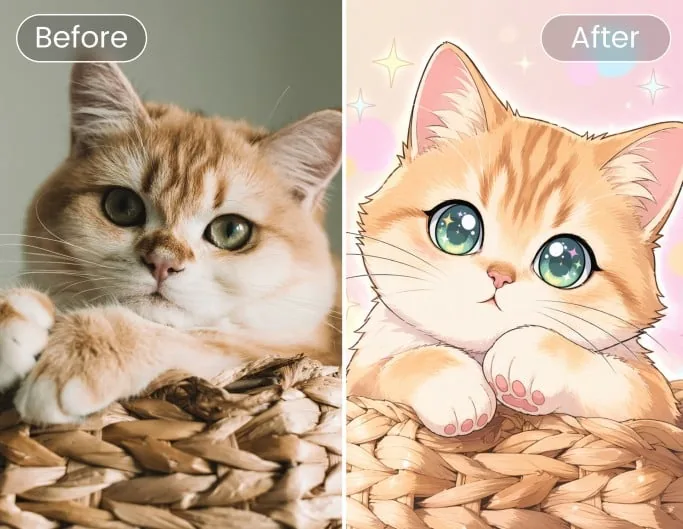
Tips that make it work
- Cage bars and bedding clutter get in the way, so photograph your pet outside the cage on a towel.
- A pair photo works too: everyone in the picture is redrawn in the same style if both faces are reasonably large.
- For the motion clip, try “wiggles its nose, nibbles a carrot, then does a small happy hop”.
Questions people ask
Will it keep my guinea pig's colors and patches?
Each style is set up to keep what makes your pet recognizable, though small details can shift. Run it again if a patch goes missing.
Does the cartoon move on its own?
No, this tool draws a still picture. Make it move sends it to the video generator, which is priced as a video.
Can I turn it into a sticker or print?
Yes. Download the picture, with no watermark, and use it for a sticker, a poster or a card.
Ready to make yours?
The prompt above is written for exactly this. Start with it and change the details to fit.
Open Photo to CartoonRelated questions
- How can I make a funny dog meme video with AI?
- How can I make a video of an animal skateboarding?
- How do I make a dancing soda can video?
- How do I make a cartoon of animals dancing for kids?
- How can an animal shelter make an animated adoption video?
- How do I make an animated ad for my pet store or grooming salon?
- How do I turn a photo into an animated cartoon video?
- How do I turn myself into an anime character?