
Step by step
- 1
Upload your photo
A clear, well-lit selfie, family shot or pet photo works best. JPG, PNG, WebP and iPhone HEIC are accepted.
- 2
Pick a cartoon style
Choose 3D cartoon, classic animated, 2D cartoon, comic book or chibi avatar. The picture is ready in about half a minute.
- 3
Press Make it move
This opens the video generator with your cartoon as the first frame.
- 4
Describe the motion and generate
Write what should happen, choose the shape and length, and generate. The video is priced separately from the picture, shown on the button before you start.
- 5
Download the clip
The clip downloads as an MP4 without a watermark.
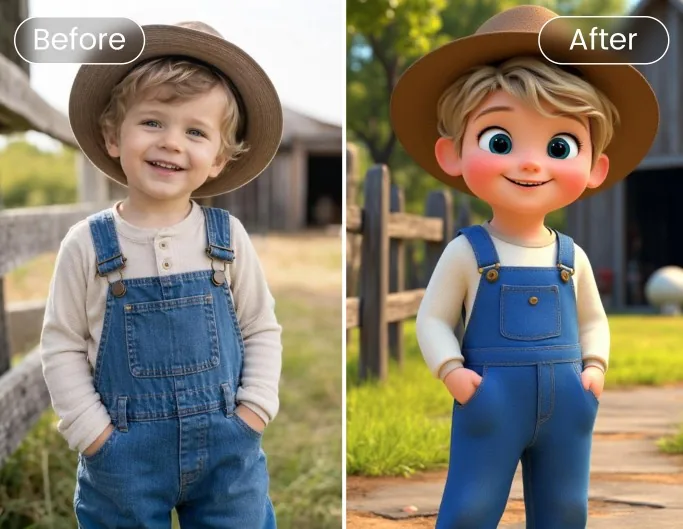
A real example
Tips that make it work
- Run the photo through two styles before animating; the picture you pick sets the look of the whole clip.
- Ask for one main movement. A wave, a wink or a small dance reads better in a few seconds than several actions at once.
- Group photos and pets work too: everyone is redrawn in the same style, so the whole family can wave together.
Questions people ask
Will the cartoon still look like me?
Every style keeps your face shape, hairstyle, skin tone and outfit, so the cartoon is recognizably you. If one try misses, run it again or switch style.
Is the video priced the same as the picture?
No. The cartoon picture and the video are charged separately. The video's cost depends on the model and length you pick and is shown before you start.
Can I do this on my phone?
Yes. Both steps work in a mobile browser, and iPhone photos are converted on upload.
Ready to make yours?
The prompt above is written for exactly this. Start with it and change the details to fit.
Open Photo to CartoonRelated questions
- How do I turn our family photo into a cartoon?
- How do I turn a couple photo into a cartoon for our anniversary?
- How do I animate an old family photo?
- How do I make a still photo move with AI?
- How do I animate my sketch with AI?
- How do I animate my kid's drawing as a gift for the grandparents?
- How can I turn my guinea pig or hamster into an animated cartoon?
- How do I turn a video of myself into a cartoon?